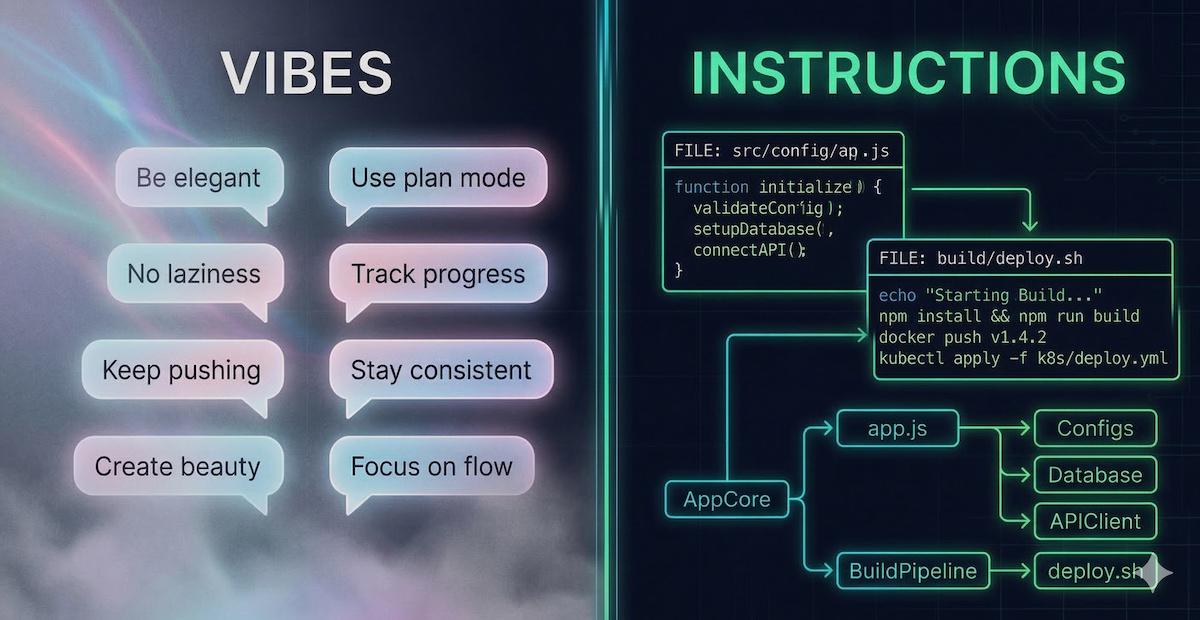
There’s a growing trend in the AI-assisted coding world. People are posting their AGENTS.md, CLAUDE.md, or .cursorrules files on social media and writing blog posts about their “ultimate AI coding configuration”. The configs go viral. Everyone copies them into their own repos. Problem solved, right?
Not quite. Most of these files are stuffed with two things the AI can’t actually use: motivational philosophy (“demand elegance”, “no laziness”) and personal workflow habits (“always use plan mode”, “track progress in todo.md”). Neither tells the model anything about your codebase. A good agent configuration file should read like an internal onboarding doc, not a motivational poster. If yours could be dropped into any repo on GitHub and nothing would change, it’s time for a rewrite.
The “vibes” anti-pattern#
Let’s look at the kind of content that shows up in these viral configs. It usually falls into two buckets.
Bucket 1: motivational philosophy#
## Core Principles
- **Demand Elegance:** Pause and ask "is there a more elegant way?"
- **No Laziness:** Find root causes. Senior developer standards.
- **Simplicity First:** Make every change as simple as possible.
- **Minimal Impact:** Changes should only touch what's necessary.
AI models don’t have an ego to motivate. They don’t have pride you can appeal to. They don’t get lazy and need a pep talk. What they have is a context window, and every line of generic philosophy you put in there displaces a concrete instruction that could actually prevent a real mistake.
“Demand elegance” tells the model nothing about your codebase. “Never call the Stripe API directly; always use the billing wrapper in src/billing/client.ts” tells it exactly what to do and what to avoid. One is vibes. The other is an instruction.
Bucket 2: personal workflow habits#
This one is sneakier, because it looks technical and actionable:
## Workflow Orchestration
- Enter plan mode for ANY non-trivial task (3+ steps).
- Use subagents liberally to keep the main context window clean.
- Write plan to `tasks/todo.md` with checkable items.
- After ANY correction, update `tasks/lessons.md` with the pattern.
- Never mark a task complete without proving it works.
This is solid advice for how you use your AI tool. But it says absolutely nothing about your project. These are prompting habits and orchestration preferences. Paste them into any other repo and they work just as well (or just as poorly). They belong in a blog post about AI workflows, not in a project-level config file.
The distinction matters: your agent config should tell the AI what it needs to know about your codebase, not how you want to orchestrate your sessions. The model doesn’t need motivational coaching or workflow choreography. It needs project context.
Here’s a simple litmus test: could you paste your agent config into any other repository and nothing would change? If yes, you’ve written generic prompting advice, not project-specific instructions. The model was trained on the entire internet. It already knows what “clean code” and “SOLID principles” are. What it doesn’t know is why your payment service has that weird retry loop, or that the User model has a soft-delete flag everyone forgets to filter on.
What actually belongs in there#
The stuff that makes an agent config genuinely useful is boring, specific, and deeply tied to your project. Here’s an example:
# Project: Acme Billing Service

## Architecture
- Never call the Stripe API directly. Use the billing wrapper
  in `src/billing/client.ts`, which handles retries and idempotency keys.
- The `notifications` service reads directly from the `orders` table.
  Any schema change to `orders` must be coordinated with the
  notifications team first.

## Gotchas
- The `User` model has a `deleted_at` column. Always filter
  by `deleted_at IS NULL` unless explicitly querying archived users.
- The `orders` table uses `BIGINT` IDs, not UUIDs. Don't change this;
  the analytics pipeline depends on sequential ordering.

## Build and test
- Run `make lint && make test` before committing.
  CI uses a custom ESLint config that differs from the VS Code default.
- Integration tests require a running Postgres container:
  `docker compose up -d db` before running `make test-integration`.

## Conventions
- API responses follow the envelope format in `docs/api-envelope.md`.
- Error codes are defined in `src/errors/codes.ts`. Add new codes there,
  never inline error strings in handlers.
Notice the difference? Every single line references something specific: a file path, a table name, a command, a constraint. A stranger reading this would immediately learn things they could never figure out from skimming the code alone. And pasting it into a different repo would make absolutely no sense.
That’s the goal.
Build it incrementally, not upfront#
Here’s a trap I see people fall into: they sit down, try to think of every possible mistake an AI could make, and write fifty lines of preventive instructions. Half of those lines end up being generic best practices the model already follows (“don’t use raw SQL”, “handle errors properly”, “write unit tests”). The other half are hypothetical scenarios that may never come up.
A better approach: start small and grow your config from real experience.
Begin with the handful of traps you already know about: the gotchas you warn new team members about, the constraints that aren’t obvious from the code, the build commands that are tricky. Then, every time the AI gets something wrong, ask yourself: “would a specific instruction in the config have prevented this?” If yes, add it. If the model keeps using raw queries instead of your repository layer, that’s when you add “all database access goes through src/repos/”. Not proactively, not because it seems like a good idea, but because you’ve seen the problem happen.
Your agent config is a living document. The best ones aren’t written in one sitting; they accumulate over weeks of actual use. Each entry has a story behind it: “I added this because the AI kept doing X.” That’s how you know every line is earning its place in the context window.
The “day-one engineer” test#
Here’s the mental model I find most useful: imagine a smart, experienced engineer starting on your project tomorrow. They know the language, they know the frameworks, they’re competent. What would trip them up? What mistakes would they make in their first week?
That’s what belongs in your agent config.
They wouldn’t need you to tell them to “write clean code” or “follow best practices”. They already know that. But they would need to know that:
- The legacy auth module uses a non-standard JWT format, and replacing it with a standard library will silently break token validation for existing users.
- The
config/directory has two files that look identical but one is for local development and the other for staging, and mixing them up causes a cascade of silent failures. - The CI pipeline runs on a specific Node version that doesn’t match the
.nvmrcbecause the runner image hasn’t been updated yet, so certain syntax features will fail in CI but pass locally.
These are the kind of traps that catch intelligent people who simply lack context. An AI agent is exactly that: intelligent (in its way), but lacking context. You’re not motivating it. You’re briefing it.
Beyond AGENTS.md#
Different tools have adopted different filenames for this concept, but the principle is identical:
AGENTS.mdfor GitHub Copilot and VS CodeCLAUDE.mdfor Anthropic’s Claude Code.cursorrulesfor Cursor- Various other tools have their own conventions
The ecosystem is converging on the same idea: a project-level file that gives AI agents the context they need to work effectively in your codebase. The name doesn’t matter. The content does. And the content should be specific, concrete, and tied to your project, not generic advice that applies to any codebase.
Quick checklist#
Before you commit your agent config, run through this:
- ✅ Every line references something specific to your project (a path, a module, a command, a constraint)
- ✅ A stranger reading it would learn something they can’t figure out from the code alone
- ✅ Pasting it into a different repo would break or make no sense
- ✅ It includes verified build, test, and lint commands
- ✅ It warns about at least one non-obvious trap or gotcha
- ❌ It does not include generic software engineering philosophy the model already knows
- ❌ It does not include personal workflow or orchestration habits that aren’t project-specific
If most of your file fails these checks, don’t feel bad. Almost everyone’s first attempt is full of vibes. The important thing is to rewrite it with the specifics that actually help.
Going further#
This post focused narrowly on what belongs inside the file. But an agent config is just one piece of the puzzle. If you’re interested in the broader workflow of preparing your codebase for AI (documentation structure, test investment, feedback loops), I wrote about the full approach in Onboarding AI into your codebase.
The short version: treat AI like a new team member. Brief it properly, give it a safety net of tests, and build a loop where every interaction makes the next one better. Your agent config file is the “read this first” document in that onboarding pack. Make it count. 🤖
Happy coding!