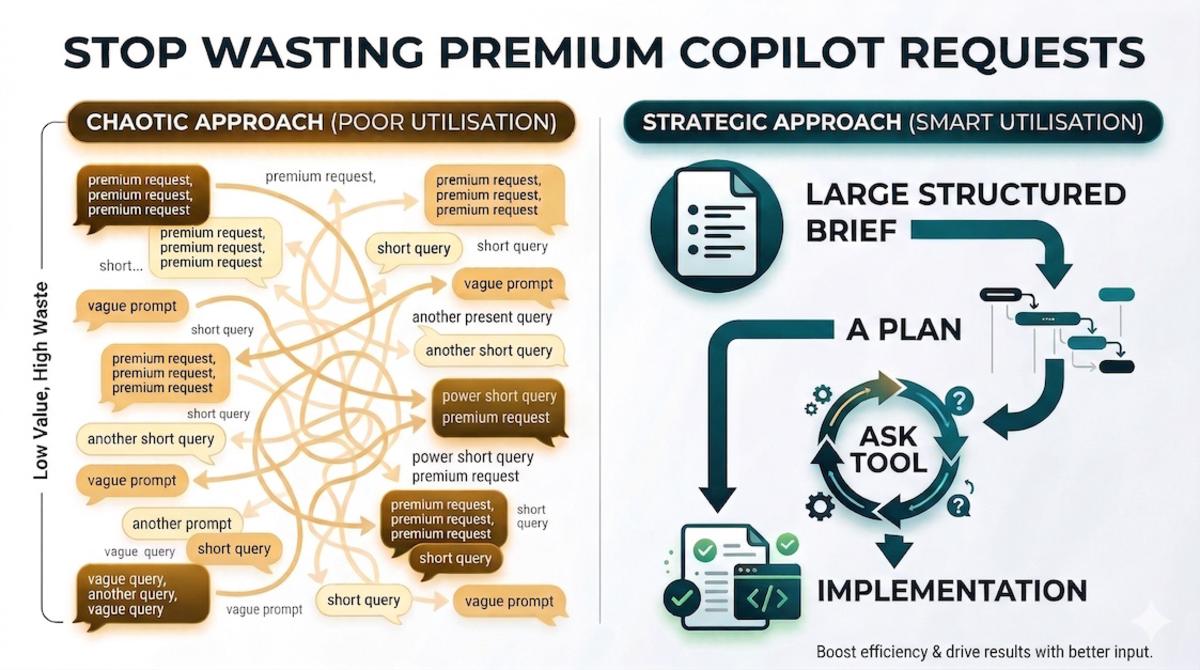
I keep seeing engineers burn through 100 premium requests in an hour, then wonder why their engineering managers think GitHub Copilot is getting too expensive.
Most of the time it’s a workflow problem, not a pricing one.
Premium requests are at their best when you give them a full-bodied brief, let the model do a serious pass, and then tighten the result without restarting the whole exercise. If you’re using them like a quick chat window, you’ve basically built a monster gaming PC to play the original Monkey Island 🐒
There’s also a built-in trick, hiding in plain sight, that can completely change the economics of premium usage. You’ve probably already seen it in action without realising how far you can push it.
Why so many premium requests get wasted#
If you’ve read my post on choosing the right GitHub Copilot model for the job, you already know the principle: start cheap to explore, pay more when the extra reasoning actually reduces mistakes and rework.
The anti-pattern I keep seeing is the opposite:
- Send a vague prompt to the premium model.
- Get an answer that’s a bit off.
- Send another short correction.
- Get another answer that fixes one thing and breaks another.
- Repeat ten times. Wonder where all the credits went.
That’s the worst possible way to spend premium requests. You’re paying for a stronger reasoning pass, then feeding it one sentence at a time.
Rule of thumb: premium requests are for high-leverage turns, not for exploratory chatter.
Exploration is where you’re still clarifying the problem: what are we changing? Which constraints matter? Is this even the right approach? That stage is messy by nature, and that’s exactly why I prefer doing it with a free or cheaper model whenever possible.
Same thing with planning. People jump straight into implementation and then spend a pile of premium requests correcting an implementation that should never have started in that shape. Plan mode exists for a reason: move the hard thinking earlier, flush out missing constraints while changes are still cheap, and agree on the shape before code starts drifting. As I wrote in onboarding AI into your codebase, good documentation and a good plan reduce guesswork, which reduces churn, which reduces cost.
If the plan is strong, implementation becomes boring, and I mean that as a compliment ✅
The trick nobody talks about: use the ask tool to stretch a single session#
Right, the bit you actually came here for.
When you use plan mode in VS Code or GitHub Copilot CLI, you’ve probably already seen the agent stop and ask you a few clarifying questions before it commits to a plan. That behaviour isn’t magic: it’s baked into the instruction layer.
But you don’t have to stop there.
You can explicitly tell the agent to:
- use the ask tool to ask you clarifying questions
- show you the high-level plan
- ask whether you’re happy with it
- keep iterating until you explicitly say you are
Instead of spending new premium requests to nudge the plan from the outside, you keep working the same session until the plan is right. That’s the real trick: one premium request, stretched into a proper working session.
What this looks like in practice#
Say I want to add a new API endpoint that touches three services. I’d paste something like this into a premium request:
I would like to plan a functionality to [describe the feature].

Please read the relevant project docs before reading code, and only inspect the code that is relevant to the task.

Use the ask tool to ask me any clarifying questions you need.

When you have enough context, output a high-level implementation plan and then use the ask tool to ask me if I am happy with the plan or what I want changed.

Iterate until I explicitly say I am happy. Do not stop until then.
And then, inside that same session, the exchange looks something like this:
Agent: Before I plan this, a few questions:
- Should the new endpoint reuse the existing auth middleware or does it need a separate policy?
- I see
OrderServiceandBillingServiceboth touch the orders table. Which one should own the write?- Do you want integration tests as part of this plan or a separate follow-up?
Me: Reuse existing auth. BillingService owns the write. Include integration tests.
Agent: Here’s the plan: [5-step breakdown with file paths and test approach] Are you happy with this, or would you like changes?
Me: Move step 3 before step 2, and add a rollback strategy for the migration.
Agent: Updated plan: [revised]. Happy with this?
Me: Yes, go ahead.
That whole exchange was one premium request. Without the ask tool loop, each of those corrections would have cost me a separate turn. I used to do it the expensive way (embarrassingly often 🤦♂️) before I cottoned on to this.
The prompt does a few useful things worth calling out:
- it forces documentation-first discovery
- it reduces random codebase wandering
- it gives the agent permission to clarify before committing
- it creates an explicit review loop with a clear stop condition
That last point matters. Most people review the plan passively. I prefer turning the review into a loop where the agent keeps asking until I explicitly sign off.
The ask tool is a real, exposed tool capability, not just the model “being clever”. In VS Code’s coding agent and GitHub Copilot CLI, for example, it surfaces as a dedicated question tool the agent can invoke.
This works outside plan mode too#
Planning is the obvious use case, but you can use the same pattern in agent mode and in custom agents. The workflow is the same: tell the agent to keep using the ask step to refine the output until you’re happy. It works just as well for:
- refining a code review checklist
- iterating on a migration strategy
- tightening a PR description
- shaping a docs rewrite before content gets generated
The common thread: if the expensive part is the reasoning pass, make that pass count. Keep the feedback loop inside the session instead of constantly restarting.
Quick cheat sheet#
- Use free or cheaper models for messy exploration and clarifying the problem.
- Use plan mode first so implementation starts from an agreed shape.
- Use fuller prompts instead of sentence-by-sentence nudges.
- Use the ask tool to keep refining within one premium session.
- Only then switch to implementation, grounded in the agreed plan.
If there’s a best-kept secret in GitHub Copilot right now, it’s probably this: the ask tool lets you turn one good premium request into a proper working session.
You don’t have to throw a premium request away the moment the first answer is slightly off. Keep the loop going, refine the plan, answer clarifying questions, and only stop when you’re actually happy. The economics look much better when you do.
So if you’re burning premium requests at a ridiculous rate, don’t start by blaming the model or the pricing. Look at the interaction pattern first. In most cases, you don’t need to use Copilot less. You need to make better use of the ask tool.
Happy prompting! 🚀