
One of the most common questions I get asked is: “Which AI model should I be using with GitHub Copilot?”
Open GitHub Copilot today and you are greeted with a dropdown menu that looks like a wine list. Sonnet? Gemini? Opus? GPT-5? 🤯 It used to be simple, but now it can be paralysing.
Which one is best? It depends on what you are trying to achieve, how complex the task is, and how you want to manage your credit usage.
My rule of thumb is simple:
- Start cheap to think and iterate.
- Pay for certainty when the blast radius is big.
The breakthrough moment#
At the end of last year, the release of Claude Opus 4.5 marked a significant turning point for AI-assisted development.
For me, the penny dropped when I trusted Opus with a messy multi-file refactor. It didn’t just guess; it actually reasoned through the dependencies. That’s when I stopped treating it like a fancy autocomplete and started treating it like a pair programmer 🤖.
The key signal wasn’t “this is hard”. It was “if this goes wrong, I’m going to spend an afternoon untangling it”. That’s when premium models start paying for themselves.
Understanding credit costs#
Before diving into model selection, it’s worth understanding how credits work. GitHub Copilot uses a multiplier system:
| Model tier | Examples | Credit multiplier |
|---|---|---|
| Free | GPT-4o, GPT-5 mini | 0x |
| Light | Claude Haiku 4.5, Gemini 3 Flash | 0.33x |
| Standard | Claude Sonnet 4.5, Gemini 2.5 Pro, GPT-5 | 1x |
| Premium | Claude Opus 4.5 | 3x |
As of Jan 2026: these tiers/multipliers and model names depend on your GitHub Copilot subscription and what GitHub has enabled for your organisation/region. This is also just a subset of my go-to models, not an exhaustive list.
The free tier models are perfectly capable for many tasks — and they’re a goldmine for planning and discussion. Need to brainstorm an implementation approach? Refine your architecture? Talk through edge cases? Use GPT-4o or GPT-5 mini. You can iterate endlessly without burning a single credit.
One more thing: credits are only half the story. Latency is a hidden tax. If a “smarter” model doubles the time per iteration, you may end up doing less thinking, not more.
The cost vs. capability trade-off#
Not all tasks require the “smartest” model. In fact, using the most powerful model for everything can be slower and more expensive.
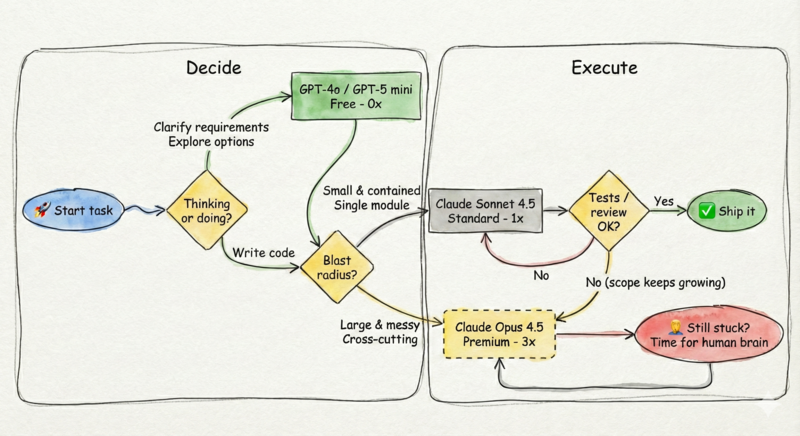
Here is my mental flowchart for selecting the right model (and yes — it’s a loop):
When to use each tier#

Before we go model-by-model, here’s the mental model that keeps me honest:
- Use free models to decide what to do.
- Use standard models to do the work.
- Use premium models to avoid expensive mistakes.
Coming next: model selection is only half the game. In the next post I’ll cover model × mode (Chat vs Edits vs Agent):
- Chat: explore options, de-risk decisions, create a plan.
- Edits: focused changes when you already know what you want.
- Agent: bigger tasks with tests + verification in the loop.
Follow me on Twitter @AleFranz (or connect on LinkedIn) if you want a nudge when it’s out.
Free models (GPT-4o, GPT-5 mini) — planning and discussion#
- Brainstorming implementation approaches
- Discussing trade-offs between solutions
- Explaining code or concepts
- Drafting documentation
- Refining requirements before coding
Standard models (Sonnet 4.5) — day-to-day coding#
- Analysing the codebase to define a concrete implementation plan
- Writing unit tests for a function
- Implementing a new API endpoint
- Fixing bugs with clear stack traces
- Adding error handling to existing code
- Code reviews and suggestions
Premium models (Opus 4.5) — complex reasoning#
- Deep codebase analysis to maintain consistency with existing patterns across services
- Refactoring a payment processing flow across Order, Payment, and Notification services
- Architectural changes that touch multiple modules
- Debugging subtle race conditions or memory issues
- Migrating codebases between frameworks
Pro tip: If you’re working with microservices, create a VS Code workspace that includes multiple repositories. This gives the model visibility across service boundaries and dramatically improves refactoring suggestions.
Common failure modes (and guardrails)#
Here’s the stuff I see all the time:
- Free/fast models: great ideas, but they’ll hand-wave details. Guardrail: ask for acceptance criteria and tests first.
- Standard models: usually solid, but can miss subtle integration points. Guardrail: point them to “one good example” in your codebase and say “follow this pattern”.
- Premium models: can get ambitious and propose sweeping refactors. Guardrail: require a plan and incremental diffs (small PR-sized steps).
How I switch models (the signals)#
I don’t switch models because I’m “stuck”. I switch when the shape of the problem changes:
- I’ve corrected the same misunderstanding twice.
- The scope keeps creeping (“while you’re here, can you also…”) and I can feel context slipping.
- The change crosses boundaries (multiple folders/services/repos) and consistency matters.
- The bug is subtle (timing, concurrency, memory) and guessing will waste time.
When I see those, I’ll often jump to a premium model for one round of deep reasoning, then drop back to standard to do the implementation work.
The verification loop (my guardrails)#
Models are great at generating code. They are not great at knowing when they are wrong.
- Ask for tests first (it forces a definition of done).
- Run the tests/linters (or have the agent run them).
- Ask GitHub Copilot for an internal review of its own changes.
- For risky work: require a short plan, then implement in small diffs.
Team / enterprise constraints#
- Model availability varies by subscription, organisation policy, and region.
- Don’t paste secrets. Prefer pointing GitHub Copilot at files over dumping logs into chat.
- Consider standardising a team default (e.g., standard model for day-to-day) and allow escalation when the blast radius is high.
Key principles#
- Don’t kill a fly with a bazooka: for simple drafting or explaining code, Sonnet is plenty smart and blazing fast. For planning? Use the free models — iterate without cost.
- Pay for certainty, not for vibes: the premium model earns its keep when the cost of being wrong is high (blast radius, coordination cost, “this breaks prod”).
- Optimise for iteration speed: a cheaper model that needs 3 iterations might cost you more time than a smarter model that gets it right first time. If you find yourself correcting the model more than twice, switch up.
Quick cheat sheet#
- Free (0x): brainstorming, requirements, “what are the edge cases?”, turning vague ideas into a checklist.
- Standard (1x): day-to-day coding, tests, straightforward bugs, bounded refactors.
- Premium (3x): cross-cutting work, messy refactors, subtle debugging, high-risk architectural changes.
If you have a favourite default ladder (or a model you swear by), let me know on twitter @AleFranz.
Happy prompting!